The short answer
You can connect AI to business systems through MCP APIs and keep control, but only if the controls sit in your code, your identity provider and your network, not in the model’s judgment. The OWASP MCP Security Cheat Sheet puts the core issue plainly: “MCP lets LLMs decide which tools to invoke, when, and with what parameters.” Narrow tokens, approved servers, human approval for writes and complete logs keep a manipulated model from doing much damage.
What “MCP via API” means
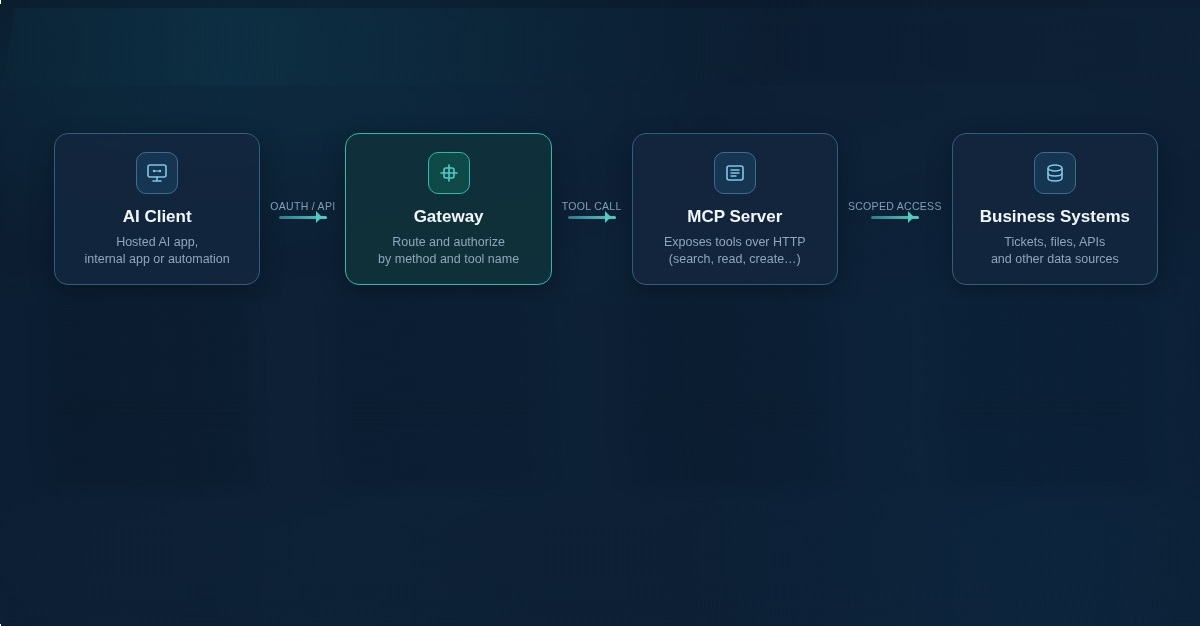
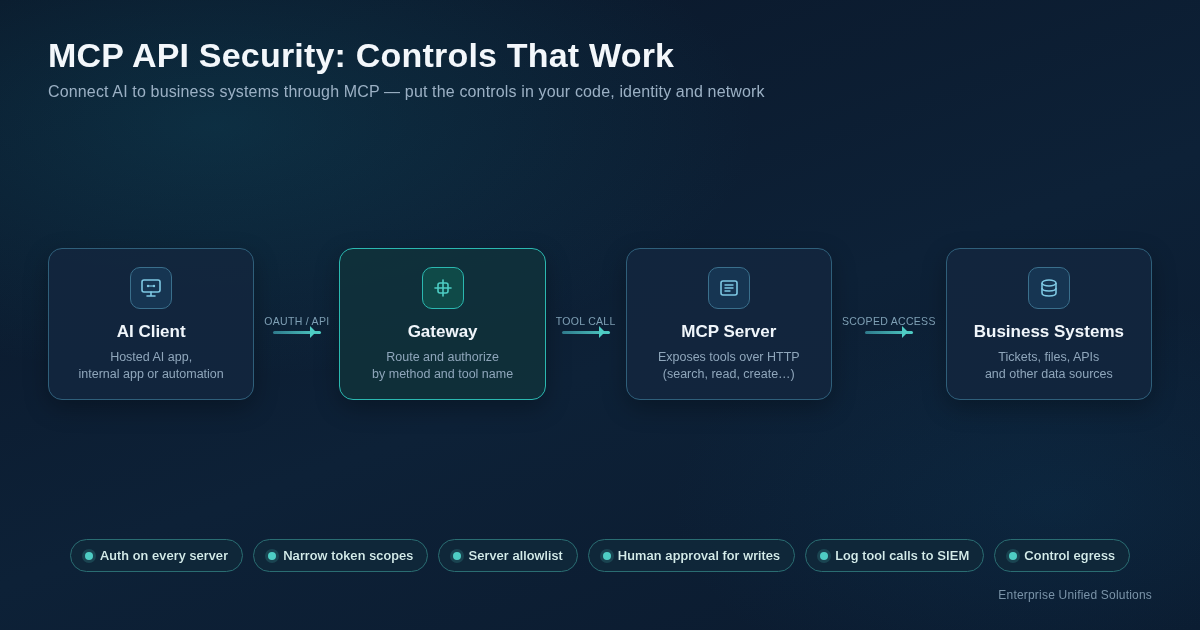
An MCP server exposes tools (search tickets, read a file, create an invoice) over HTTP. An MCP client, inside a chat app, an AI platform’s cloud or your own application, lists those tools and calls them when the model asks. The MCP authorization spec treats the server as an OAuth 2.1 resource server: clients get a token from an authorization server and present it on each request. Two details matter for risk:
- The spec says “Authorization is OPTIONAL for MCP implementations.” A server can ship with no authentication at all.
- If the server doesn’t say which scope it needs, the spec tells clients to request every scope the server lists as supported.
The July 2026 spec release made the protocol stateless, retired the Mcp-Session-Id header and added Mcp-Method and Mcp-Name headers “so gateways can route and authorize on headers directly.” It also deprecated dynamic client registration and added an Enterprise Managed Authorization extension. Those changes help defenders, but many deployed servers still run older versions.
Where API-based MCP goes wrong
1. Prompt injection through tool results. Anything a tool returns (an email body, a ticket, a web page) lands in the model’s context and can carry instructions. OWASP’s guidance is to “treat every tool response as untrusted data, including responses from approved servers.” Invariant Labs showed a malicious public GitHub issue steering an agent into leaking private-repository data. Prompt injection is LLM01 in the OWASP Top 10 for LLM Applications 2025.
2. Tool poisoning, shadowing and rug pulls. Tool descriptions are also model input. Invariant Labs demonstrated hidden instructions in a tool description, a malicious server redirecting a trusted server’s email tool, and “rug pulls,” where a server changes a tool description after approval. Trail of Bits calls this “line jumping” because it works before any tool is called.
3. Over-scoped tokens and the confused deputy. One token with full-mailbox or full-drive scope turns any compromise into a large one. The MCP Security Best Practices list wildcard scopes and “publishing all possible scopes in scopes_supported” as common mistakes. The same page describes a confused-deputy attack on MCP proxy servers that use one static client ID with third-party APIs, and requires per-client consent. The joint CISA, NSA and partner guidance on agentic AI gives a procurement-agent example where an attacker who compromises a low-risk tool inherits the agent’s broad privileges.
4. Token passthrough. Some servers accept a client’s token and forward it to a downstream API. The spec forbids this (“MCP servers MUST NOT accept or transit any other tokens”) because it bypasses audience checks, breaks audit trails and lets a stolen token turn the server into a proxy for data exfiltration.
5. State-handle and session hijacking. Servers that track work across calls hand out identifiers. The spec says servers “MUST NOT treat possession of a state handle as authentication” and should check authorization on every call. Session-hijacking guidance still applies to servers on the 2025-11-25 spec and earlier.
6. Unauthenticated or exposed servers. Knostic found 1,862 MCP servers exposed to the internet; all 119 it checked manually listed their tools without authentication. Wiz reported an MCP authentication bypass in the LiteLLM AI gateway (CVE-2026-59822), where “Authorization: Bearer a, containing a single character, is enough,” and found 9.6% of 3,074 public instances accepted the default key or required no authentication.
7. SSRF through OAuth discovery. During authorization, clients fetch metadata URLs supplied by the server. The spec warns a malicious server can point those at internal addresses such as the cloud metadata endpoint 169.254.169.254.
8. Supply chain. The npm package postmark-mcp was clean for 15 versions, then began copying every email to an attacker, per Postmark and Snyk. JFrog reported CVE-2025-6514 in mcp-remote, a client-side proxy, where a malicious server could trigger command execution.
9. Exfiltration and logging gaps. Data can leave through a legitimate channel: a tool argument, a link or an outbound request. Simon Willison notes that “if a tool can make an HTTP request… that tool can be used to pass stolen information back to an attacker.” The CISA-led guidance adds that tools “may operate outside of the system’s monitoring boundary.”
Best practices
- Require authentication on every remote server. Follow the spec: OAuth 2.1, Protected Resource Metadata, resource indicators and audience validation. Never put tokens in query strings. Reject any server that lists tools to an anonymous caller.
- Scope tokens to the task. Read-only by default, narrow scopes, short-lived tokens, per-user delegation instead of a shared service key, with step-up authorization when a write is needed. The CISA-led guidance recommends replacing “static, long-lived secrets with ephemeral credentials.”
- Allowlist servers by exact URL. Deny by default and keep a registry with an owner, purpose, data reached and credential type for each server.
- Pin and review tool definitions. OWASP recommends pinning full tool definitions by hash and re-approving on any change. It also notes “tool annotations are hints, not enforcement.”
- Filter inputs and outputs, but don’t rely on filters. Strip secrets and hidden instructions from tool output. OWASP cautions that filters “cannot establish that the remaining text is safe.”
- Enforce authorization in trusted code. Check each tool call against the user’s actual permissions in code, independent of what the model asks for (OWASP).
- Human approval for writes, sends, deletes and payments. Show the full parameters. The MCP tools spec says there “SHOULD always be a human in the loop with the ability to deny tool invocations.”
- Control egress. Allowlist outbound destinations from MCP servers and gateways, block private ranges and cloud metadata, and use an egress proxy as the spec recommends.
- Log every tool call to your SIEM. Log user, agent, tool, parameters, result size and time, with secrets redacted. The tools spec tells clients to “log tool usage for audit purposes.”
- Use a gateway where you can. The 2026 headers let a gateway allow or block by method and tool name without parsing the message body.
- Review the vendor’s data terms. Before data flows to a hosted AI platform, read the data processing agreement for retention, training use, subprocessors and where tool calls are executed.
Can I allow sensitive data into AI through an MCP?
Sometimes, with conditions. MCP is a connection protocol and doesn’t protect data by itself. Whether sensitive data may flow depends on three things you control: the classification of the data, the contract with the AI provider and every hop the data takes (model provider, MCP server host, gateway, logs). The CISA, NSA and partner guidance is conservative: never grant agentic AI “broad or unrestricted access, especially to sensitive data or critical systems,” and start with “low-risk and non-sensitive tasks.” In our reading, that means:
- Start with internal, non-regulated data and read-only tools.
- Add confidential business data only after the vendor terms, scopes and logging are reviewed.
- Keep regulated data (CUI, ITAR, health or payment data) out unless every component is approved for it.
Can I trust an AI agent to go through my corporate data if an MCP is in the picture?
Trust the controls, not the agent. A model can be steered by content it reads, and vendors don’t claim prompt injection is solved. What you can rely on is deterministic: the token’s scope, the server’s per-user permission checks, an allowlist, approval prompts and logs. Willison’s rule is a practical test. If one agent reads untrusted content, reaches private data and can send data out, remove one of those three. An agent that searches internal documents with a read-only token and can’t send email or make web requests is a much smaller risk than one that can do all three.
How can I secure my sensitive data and still use AI to be competitive?
Pick bounded, high-volume work first: searching policies and documentation, summarizing tickets, drafting replies a person sends. Connect those through approved servers with read-only scopes, log every call, and expand access one step at a time. The CISA-led guidance calls this “phased deployment with progressively increasing access and autonomy.” In our view, this gives teams real productivity while the controls catch up, and it builds the evidence (inventory, scopes, logs) that customers, insurers and assessors increasingly ask about.
CMMC and CUI
On July 13, 2026, DoD (now styled the Department of War) suspended CMMC Phase II, which had been due Nov 10, 2026. Level 2 self-assessments against NIST SP 800-171 Rev 2 remain, and DFARS 252.204-7012 still applies.
In EUS’s reading of 32 CFR 170.19, an AI platform or MCP server that processes, stores or transmits CUI is a CUI asset in scope and belongs in your SSP. A hosted AI service holding CUI also raises DFARS 7012 cloud requirements. Our interpretation, not an official crosswalk, ties the practices above to NIST SP 800-171 requirements:
- 3.1.5 (least privilege) and 3.1.1/3.1.2 (authorized users and functions) for scopes
- 3.4.8 (allowlisting) for the server registry
- 3.3.1 (audit records) for tool-call logs
- 3.13.6 (deny by default) for egress
The safest default is to keep CUI out of MCP-connected AI unless the whole chain sits inside your CUI boundary.
This post is for IT and compliance leads at small to mid-market manufacturing, distribution, professional services, defense-supplier organizations across the USA including Indiana, western Ohio and Florida. Specifically BLS Size Class 4 (20 to 49 employees) to Size Class 8 (500 to 999 employees). It covers MCP used through APIs: a hosted AI app, an internal application or an automation calling remote MCP servers with API keys or OAuth tokens. A companion post covers AI agents running on an employee’s corporate PC.
How EUS can help
If you’re connecting AI platforms to your business systems through MCP and need to know what they can reach and whether they change your sensitive data or CUI scope. We can help you inventory those connections, review scopes and logging, and document the result.
Sources
- MCP specification: Authorization (latest), Model Context Protocol; accessed Oct 29, 2026
- MCP specification: Security Best Practices (latest), Model Context Protocol; accessed Oct 29, 2026
- MCP specification: Tools (latest), Model Context Protocol; accessed Oct 29, 2026
- MCP 2026-07-28 specification release, MCP Blog, Jul 28, 2026; accessed Oct 29, 2026
- MCP Security Cheat Sheet, OWASP Cheat Sheet Series; accessed Oct 29, 2026
- OWASP Top 10 for LLM Applications 2025, OWASP GenAI Security Project; accessed Oct 29, 2026
- Careful Adoption of Agentic AI Services, ASD’s ACSC, CISA, NSA, Canadian Centre for Cyber Security, NCSC-NZ and NCSC-UK, 2026; accessed Oct 29, 2026
- CISA, US and International Partners Release Guide to Secure Adoption of Agentic AI, CISA, May 1, 2026; accessed Oct 29, 2026
- GitHub MCP vulnerability research, Invariant Labs, May 2025; accessed Oct 29, 2026
- MCP Security Notification: Tool Poisoning Attacks, Invariant Labs, Apr 1, 2025; accessed Oct 29, 2026
- Jumping the line: How MCP servers can attack you before you ever use them, Trail of Bits, Apr 21, 2025; accessed Oct 29, 2026
- Exposing the Unseen: Mapping MCP Servers Across the Internet, Knostic, Jul 17, 2025; accessed Oct 29, 2026
- LiteLLM authentication bypass to cloud compromise, Wiz, Sep 2026; accessed Oct 29, 2026
- Information regarding malicious postmark-mcp package, Postmark, Sep 2025; accessed Oct 29, 2026
- Malicious MCP server on npm (postmark-mcp), Snyk, Sep 2025; accessed Oct 29, 2026
- CVE-2025-6514: critical mcp-remote RCE, JFrog; accessed Oct 29, 2026
- The lethal trifecta for AI agents, Simon Willison, Jun 16, 2025; accessed Oct 29, 2026
- About CMMC, DoD CIO; accessed Oct 29, 2026
- 32 CFR 170.19, CMMC scoping, eCFR; accessed Oct 29, 2026
- DFARS 252.204-7012, Acquisition.gov; accessed Oct 29, 2026
- NIST SP 800-171 Rev 2, NIST; accessed Oct 29, 2026
- Enterprise Unified Solutions, Inc.: RPO listing, Cyber AB Marketplace; accessed Oct 29, 2026